TRW & Co · Work and sponsorship
eVisa share codes: how to prove and check immigration status
An eVisa share code is a nine-character code from a person's UKVI account that lets an employer, landlord or carrier view their immigration status. Right to work codes start with "W" and last 90 days. Employers must use the Home Office online check for eVisa holders, match the photograph and keep the profile page. Expired BRPs are not acceptable proof.
Key pointFor eVisa holders, the online share code check is the only way an employer can establish a statutory excuse. A screenshot, printout or the worker's own view of the eVisa is not enough.
At a glance
Code format
Nine characters; right to work codes begin with W.
Validity
90 calendar days from issue, reusable for the same purpose.
Employer duty
Check online, match the photo, keep the profile page for employment plus two years.
Fallback
Employer Checking Service where the online check is not possible.
Deadline
Expired BRPs cannot be used to create a UKVI account after 31 December 2026.
Swipe or scroll →
eVisa share code: the short answer
An eVisa share code is a nine-character code, generated from a person's UKVI account, that lets someone else view their immigration status online. A right to work code begins with "W" and lasts 90 days. The employer enters it with the person's date of birth on GOV.UK, checks the photograph matches, and keeps a copy of the result. For eVisa holders this online check is the only way an employer can establish a statutory excuse.
This guide is written for both sides of that exchange: individuals who need to prove their status, and HR teams who need to rely on it. It draws on the GOV.UK eVisa guidance and the Home Office employer's guide to right to work checks (dated 1 October 2026), and states the position as at November 2026.
What an eVisa is, and why the card has gone
An eVisa is a digital record of a person's identity, immigration status and conditions, such as whether they may work or study. GOV.UK states that eVisas have replaced physical immigration documents. The Home Office stopped issuing biometric residence permits (BRPs) for applications made after 31 October 2024, and sponsored workers now normally receive only an eVisa when their application is granted.
To see or use an eVisa, the holder needs a free UKVI account. Accounts already exist for anyone who used the UK Immigration: ID Check app, applied to the EU Settlement Scheme, or swapped a BRP for an eVisa. The Home Office announced that more than 10 million eVisas had been issued by February 2026 (GOV.UK news, February 2026).
The practical consequence is that status is no longer proved by showing a card. It is proved by allowing a third party to look at the Home Office record, for a stated purpose, through a code.

Three kinds of share code, only one for work
When generating a code, the holder must choose why they are sharing their status. The employer's guide explains that the choice determines the first letter of the code, and that a code can only be used for the purpose originally selected.
| First letter | Purpose chosen by the holder | Who relies on it | Accepted for right to work? |
|---|---|---|---|
| W | Prove your right to work to an employer | Employers and, since 1 Oct 2026, other in-scope engagers | Yes |
| R | Prove your right to rent | Landlords and letting agents | No |
| S | Other purposes | Other services | No |
Employers will not be able to accept or use codes beginning with "R" or "S". If a candidate sends the wrong type, or the code has expired, the employer must ask for a new right to work code. Each code is valid for 90 calendar days from issue and can be used as many times as needed within that period, but only for its original purpose.
Getting an eVisa share code: the individual's side
For the person proving their status, the process has four stages. Each one can fail for reasons unrelated to the underlying permission, which is why it is worth doing well before a job starts.
- Create or find the UKVI account. You need a phone number and email address you can use each time you sign in, plus a valid passport with your application number, a valid passport with your BRP number, or an expired BRP. GOV.UK says an expired BRP can be used for 24 months after its expiry date or until 31 December 2026, whichever comes first. Do not create a second account if you already have one.
- Confirm identity and link the eVisa. Identity is usually confirmed through a smartphone app. Access is normally immediate once linked but can take up to 24 hours.
- Update your details. If your name, nationality or photograph has changed, update the UKVI account before generating a code. A mismatch between the name an employer expects and the name on the record causes delays.
- Generate a right to work code. Choose "prove your right to work to an employer". You will be shown what the recipient will see. Give the employer the code and your date of birth, or send it through the service so the employer receives an email.
GOV.UK's prove your right to work page also confirms that a non-British, non-Irish worker may choose between a share code and an eligible immigration document where they hold one, and that the employer cannot reject them for choosing the document. For most people who were granted permission in the last two years, however, there is no document: the eVisa is the only proof.
Parents and attorneys can help someone else create and manage a UKVI account, using their own contact details. When a child turns 18 or the person becomes able to manage the account, GOV.UK says the details should be updated to the holder's own.
Using an eVisa share code as an employer
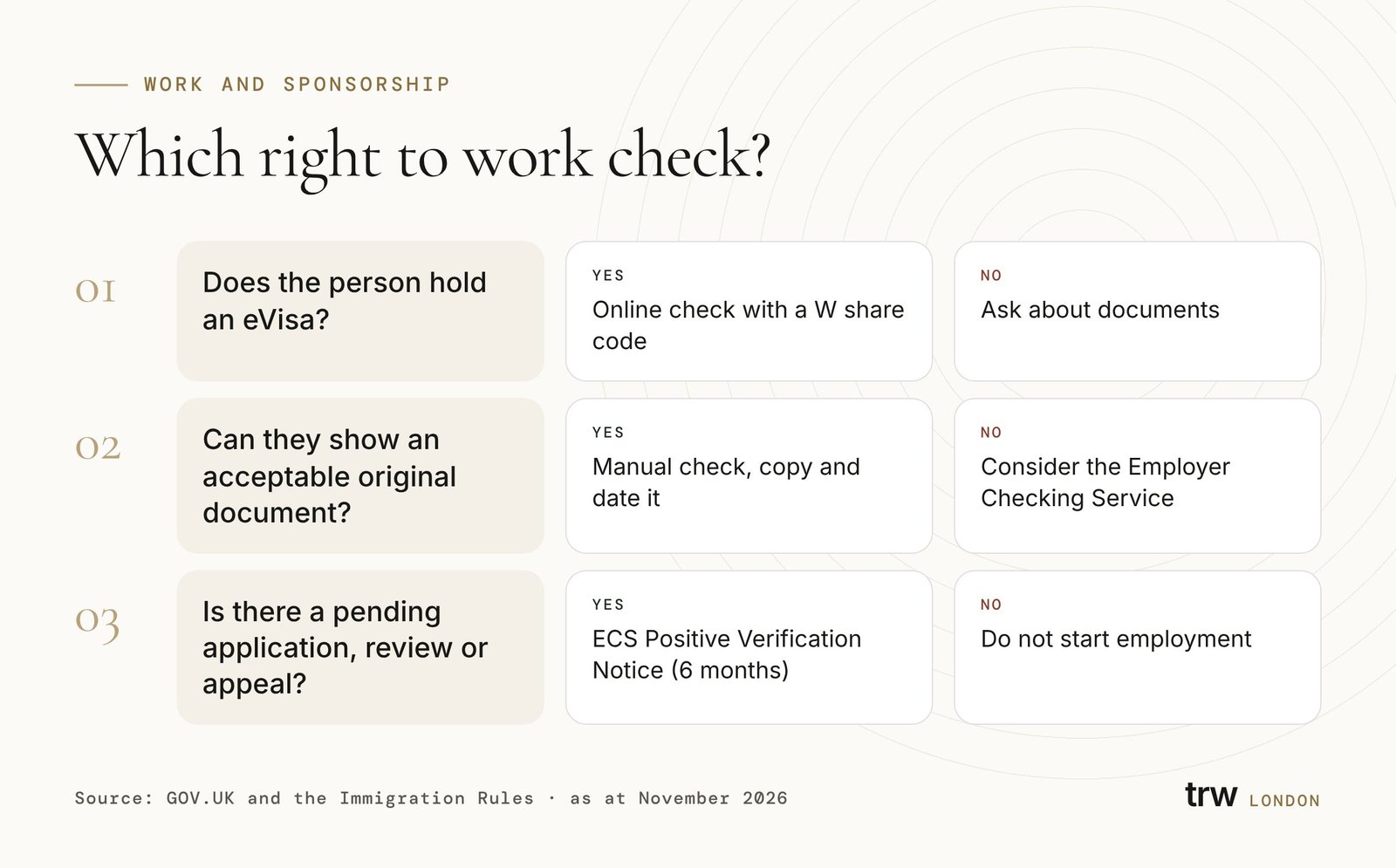
For an employer, the eVisa share code is the gateway to the Home Office online right to work check. The employer's guide makes this mandatory for eVisa holders: where an individual has an eVisa, employers must use the online service with a share code to establish a statutory excuse. The service is reached through GOV.UK's checking a job applicant's right to work page. The guide sets out three steps.
Step 1: use the online service
Enter the code and the individual's date of birth, and record the employer or business name in full. The guide notes that accurate recording of the business name supports the integrity of the check. Viewing the worker's own screen, a screenshot or a printout of their eVisa is not sufficient.
Step 2: check
Confirm that the photograph on the result is of the person in front of you. This can be done in person, by video call, or digitally using facial recognition, but only through a registered right to work digital verification service provider. Employ the person only if the result confirms they may do the work in question, and observe any restriction, such as a limit on hours.
Step 3: retain evidence
Securely store a PDF or HTML copy of the profile page, which shows the photograph and the date of the check. Keep it for the duration of employment and two years afterwards, then destroy it securely. Repeat the process for each follow-up check. If facial recognition was used, also keep the comparison.
Online check with an eVisa share code
- Mandatory where the person holds an eVisa
- Real-time Home Office data
- Retain the profile page copy
- Photo match in person, by video or via a DVSP
Manual document check
- Only where the person can show an acceptable original document
- Check the originals with the person present
- Copy every relevant page
- Expired BRPs are not acceptable
The share code tells you what the Home Office knows; the photograph check tells you it is the right person. Both are part of the statutory excuse.
Reading the result and diarising follow-up checks
The online result shows one of three broad outcomes: a continuous right to work, a time-limited right to work with restrictions, or a time-limited right to work without restrictions. The employer's guide includes examples of each.
A continuous right to work, for example indefinite leave to remain or settled status under the EU Settlement Scheme, needs no follow-up check. Time-limited permission does. The guide says employers must re-check on or before the date permission ends if they intend to continue employing the person, and that the follow-up need not use the same method as the original check.
Restrictions matter as much as dates. Student permission usually limits term-time hours, and sponsored workers may only work in their sponsored role and permitted supplementary employment. The result tells the employer what the person may do; it is the employer's job to check that the role fits within it.
Worked example (hypothetical)
Example: a London design agency offers a junior role to a candidate holding a Graduate visa. Before the start date, the candidate sends a code beginning with "R" that she had generated for her landlord. HR declines it and asks for a right to work code. She sends a "W" code; HR enters it with her date of birth, matches her face to the photograph on a short video call, and saves the profile page, which shows time-limited permission without work restrictions.
HR then diarises a follow-up check for the expiry date shown on the result. Months later, the agency decides to sponsor her as a Skilled Worker. When the new permission is granted, she generates a fresh code and HR repeats the check and retains the new profile page. At no point does a screenshot of her eVisa stand in for the check itself.
When the share code does not work
Sometimes a person who does have permission cannot produce a working eVisa share code. The employer's guide anticipates several situations.
The person has an in-time application pending
Where someone applied to extend before their permission expired, section 3C of the Immigration Act 1971 extends their existing leave until the application, and any administrative review or appeal, is decided. If they hold an eVisa, the employer should carry out an online check; the guide says it will confirm the right to work and give a statutory excuse for six months.
Our guide to section 3C leave explains the rules.
There is a technical problem with the eVisa
Where an incorrect code or result is produced, or the person temporarily cannot generate a code, employers can use the Employer Checking Service (ECS). A Positive Verification Notice gives a statutory excuse for six months. The ECS aims to respond within five working days of a valid request.
The worker is an existing employee whose permission is about to expire
If, on the date the statutory excuse expires, the employer is reasonably satisfied that the worker has an in-time application, administrative review or appeal pending, the excuse continues for up to 28 calendar days while the employer obtains a Positive Verification Notice or carries out an online check. This grace period does not apply before employment starts.
The details on the record are wrong
If the name does not match or the photograph is poor, the guide says employers should advise the individual to update their account or image. An eVisa showing the wrong status should be reported to the Home Office as an error through GOV.UK.
The person has an Application Registration Card
Asylum applicants with an ARC stating that work is permitted are checked through the ECS, not with a share code, and any occupational restriction on the permission must be observed.
A solicitor's letter or a copy of a decision does not, by itself, give an employer a statutory excuse. Only a prescribed check does. Employers who find, through a follow-up check, that a worker is working illegally lose the excuse if they continue to employ them. See our guide to illegal working civil penalties for the consequences.
BRP and eVisa deadlines to know in 2026
The move to eVisas has been phased. These are the dates that most often matter to HR teams and to individuals still holding old documents.
- 31 Oct 2024
BRPs no longer issued
The Home Office stopped producing BRPs for applications submitted after this date.
- 15 Jul 2025
Vignettes phased out
The Home Office began phasing out visa vignettes for entry clearance applicants.
- 1 Jul 2026
Form for accompanying an eVisa
Applicants without a Home Office accepted passport now receive this form instead of a vignette on a form for affixing a visa.
- 1 Oct 2026
Right to work scope extended
Workers' contracts, individual sub-contractors and online matching services became subject to right to work checks for engagements starting from this date.
- 9 Dec 2026
EUSS identity evidence
Under HC 584, BRPs can no longer be used as identity evidence for the EU Settlement Scheme.
- 31 Dec 2026
Expired BRP cut-off
The last day an expired BRP can be used to create a UKVI account, if 24 months from expiry have not already passed.
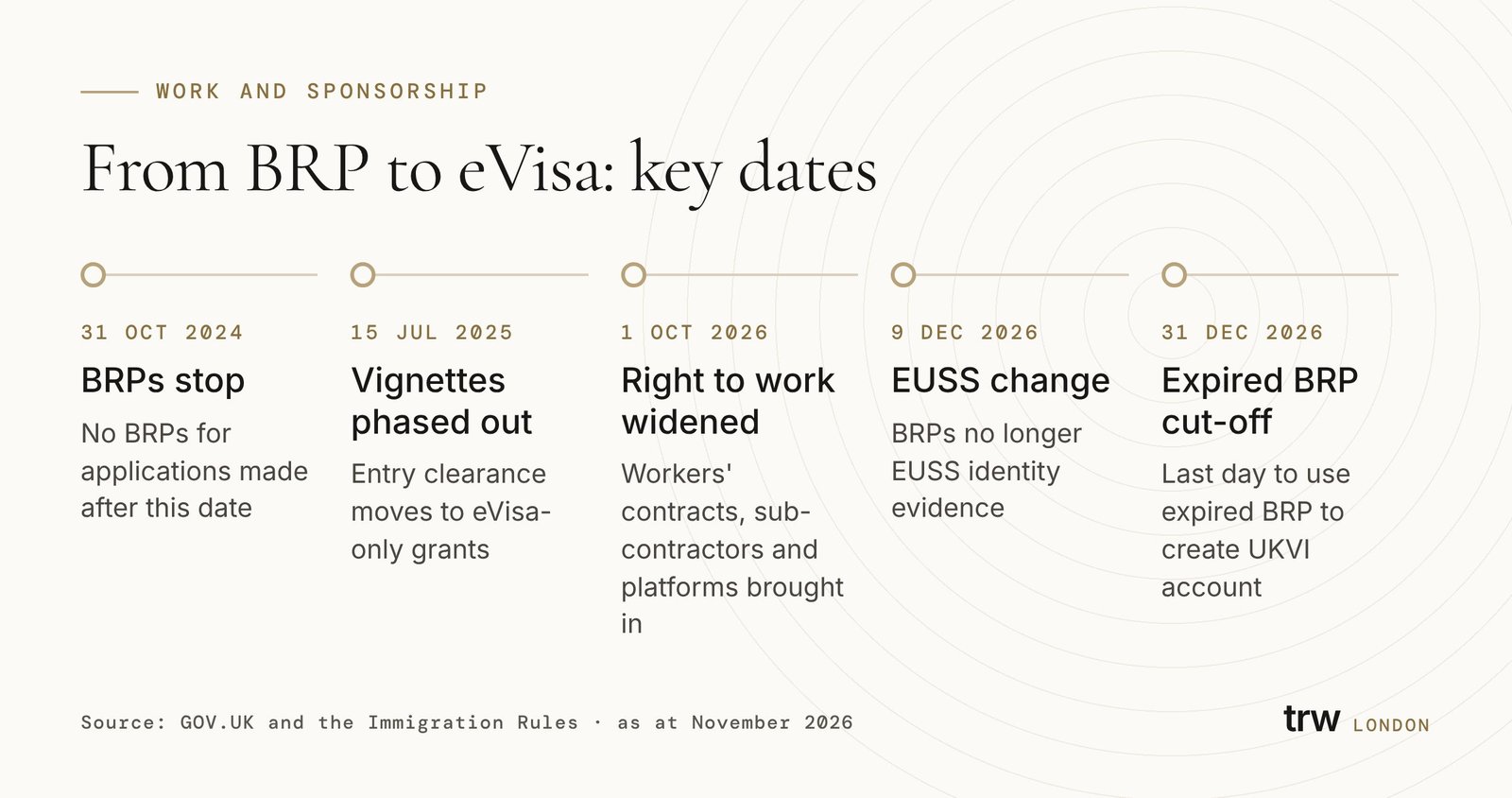
Anyone who still relies on an expired BRP to access their UKVI account should act before 31 December 2026. After that date, GOV.UK indicates an expired BRP will no longer be usable to create an account, and other identity evidence will be needed. The EU Settlement Scheme change applies earlier, from 9 December 2026 (HC 584 explanatory memorandum).
The extension of the right to work regime by section 48 of the Border Security, Asylum and Immigration Act 2025 also matters here. Businesses that engage freelancers or operate matching platforms may now need to request a right to work share code from people they never treated as employees. Our guide to the employer immigration audit explains how to identify those engagements.
Travelling with an eVisa
Carriers and border officers check eVisas electronically against the passport linked to the UKVI account. GOV.UK warns that a carrier may refuse boarding if the details are wrong. Before travelling, holders should confirm the account shows their current passport, that the eVisa shows the right status, and that the details exactly match the passenger information given to the airline.
If asked for extra proof, a holder can generate a share code for travel, which is also valid for 90 days, or show a physical document if they still have one. Someone who changes passport while abroad can update a biometric passport's details from outside the UK; other changes may need UKVI to update the account.
British or Irish dual nationals do not need an eVisa and must travel on a British or Irish passport or a passport containing a certificate of entitlement. Visitors from visa-free countries use an Electronic Travel Authorisation instead, which is a different permission.
Pitfalls for employers and individuals
- Employers: never accept a screenshot or the worker's own view of their eVisa instead of running the check yourself.
- Employers: reject codes beginning with "R" or "S" and ask for a new right to work code.
- Employers: diarise the follow-up date shown on the result, and do it on or before that date.
- Employers: record the business name in full and keep the profile page for the employment plus two years.
- Individuals: keep the passport linked to your UKVI account current, especially before travel.
- Individuals: check what the eVisa says before an employer does; report errors early.
- Both: allow time before a start date; the ECS route can take up to five working days.
Sponsors have one further duty. Part 2 of the sponsor guidance says a sponsored worker can start work as soon as their permission is valid, provided a compliant right to work check was done before the employment began. For workers granted entry clearance, sponsors may also need evidence of the date of entry. A sponsor that relies on a share code check must therefore also confirm the person entered the UK within the validity period of their visa.
Related guides
Right to work checks
The full set of prescribed checks for all nationalities.
Read the guideStatusSection 3C leave
How pending applications keep permission alive.
Read the guideEU Settlement SchemePre-settled to settled status
Moving to settled status and what changes on the eVisa.
Read the guideEnforcementIllegal working penalties
Penalty starting points and how to object.
Read the guideNext steps
If an eVisa share code is not producing the result you expect, or your HR process still relies on cards, act before the December 2026 deadlines. Employers should test their onboarding flow against the employer's guide; individuals should check their UKVI account details now.
We advise employers on right to work processes and individuals whose eVisa record is wrong or incomplete. To discuss your situation, book a consultation, or see our right to work advice page.
Frequently asked questions
01Is a share code the same as an eVisa?
No. The eVisa is the Home Office record of your status. A share code is a temporary key that lets a specific type of checker view part of that record for a stated purpose.
02Can I use the same share code for my employer and my landlord?
No. Codes are generated for a purpose. A right to work code begins with W; a right to rent code begins with R. Employers cannot accept R or S codes.
03Does a share code expire if my visa is extended?
A code lasts 90 days from issue regardless. After an extension is granted, generate a new right to work code so the employer can carry out a follow-up check showing the new permission.
04Can an employer insist on a share code instead of my passport?
If you hold an eVisa, the employer must use the online check. If you are not British or Irish and hold an acceptable original document, GOV.UK says the employer cannot reject you for choosing the document instead.
05British and Irish citizens: can they get a share code?
No, unless they hold a digital certificate of entitlement to the right of abode. They prove right to work with their passport or other listed documents, or through a certified identity service provider where they hold a valid passport.
06What if the photo on my eVisa is out of date?
Update it in your UKVI account before generating a code. The employer must be able to match the photograph to you.
07Do I need a new share code every time I travel?
Not necessarily. Your eVisa is checked electronically against your linked passport. A travel share code can be useful if a carrier asks for extra proof, and it lasts 90 days.
Sources and official materials
- eVisas: access and use your online immigration status — UKVI accounts, share codes, travel and BRP cut-off
- Right to work checks: an employer's guide — Online check steps, share code types, ECS and grace periods
- Prove your right to work to an employer — Individual's options for proving right to work
- Checking a job applicant's right to work — Employer entry point for online and manual checks
- Immigration Act 1971, section 3C — Continuation of leave pending decision
- Sponsor guidance Part 2: sponsor a worker — eVisa issue to sponsored workers and right to work timing
- HC 584 explanatory memorandum — BRPs no longer EUSS identity evidence from 9 December 2026
General information only, current as at 19 November 2026. It is not legal advice and does not create a solicitor–client relationship. It reflects the law of England and Wales unless stated otherwise; Scotland and Northern Ireland have separate legal systems, and the law changes frequently. Check current official sources and take advice on the facts of your matter.